
Private Chat in Grok
Which Grok plans have Private Chat?
Plus, Premium, Super and Ultra: Yes. Free, Teams and Enterprise: Not checked yet*.
Your plan
We haven't checked whether Private Chat is in Grok Free.
Yes. Grok Plus has Private Chat.
Yes. Grok Premium has Private Chat.
Yes. Grok Super has Private Chat.
Yes. Grok Ultra has Private Chat.
We haven't checked whether Private Chat is in Grok Teams.
We haven't checked whether Private Chat is in Grok Enterprise.
Tell us your plan to see the answer for it.
In each plan
Source for the checked plans: Consumer FAQs, checked on 20 Oct 2026
Step by step
Click Private at the top right of the start page.
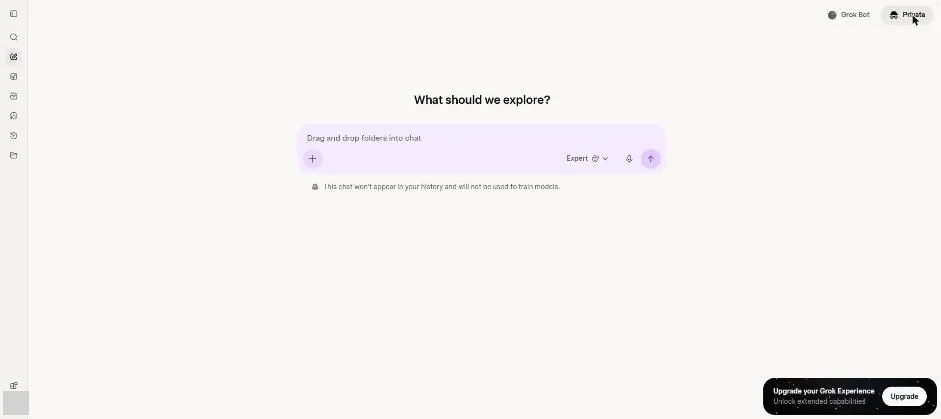
You see a purple message box and a note about history and model training.
Ask for the 50/30/20 budget idea in three short sentences.
Explain the 50/30/20 budgeting idea in three short sentences.
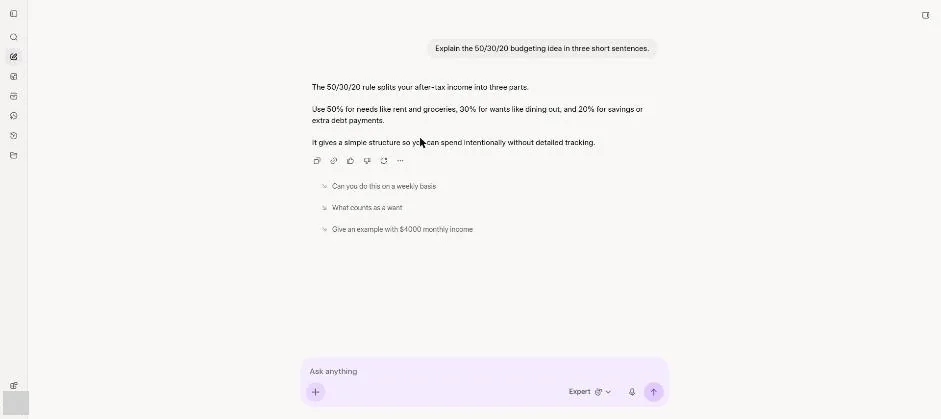
You see a three-sentence budget explanation.
Click a picture to see it full size.