
Multi-agent reasoning (Heavy-style) in Grok
Your plan
We haven't checked whether Multi-agent reasoning (Heavy-style) is in Grok Free.
We haven't checked whether Multi-agent reasoning (Heavy-style) is in Grok Plus.
We haven't checked whether Multi-agent reasoning (Heavy-style) is in Grok Premium.
We haven't checked whether Multi-agent reasoning (Heavy-style) is in Grok Super.
We haven't checked whether Multi-agent reasoning (Heavy-style) is in Grok Ultra.
We haven't checked whether Multi-agent reasoning (Heavy-style) is in Grok Teams.
We haven't checked whether Multi-agent reasoning (Heavy-style) is in Grok Enterprise.
Tell us your plan to see the answer for it.
In each plan
We haven't checked which plans include this yet.
Step by step
Open the mode menu and point at Heavy.
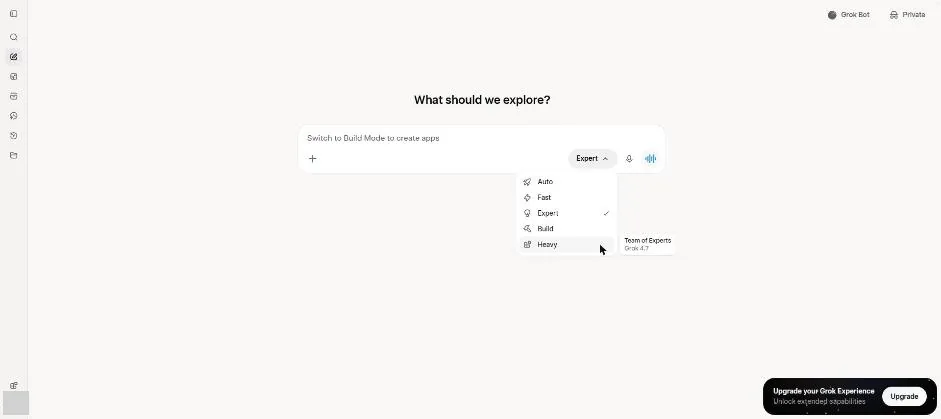
You see the Heavy tip describing a team of experts.
Click Heavy.
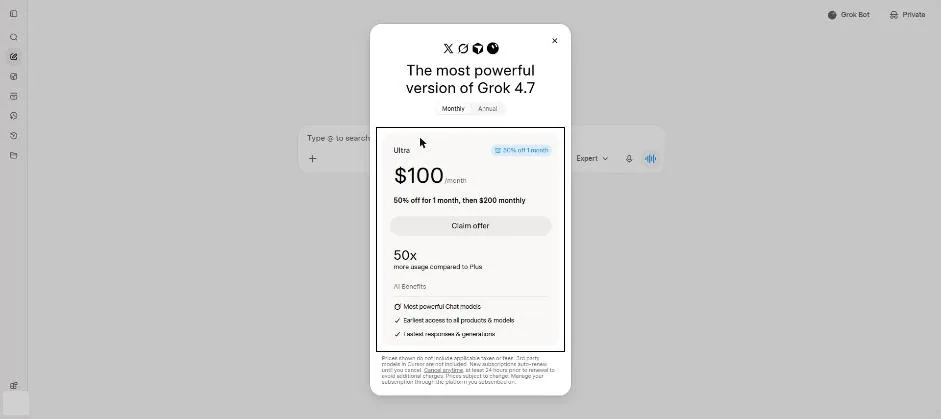
You see an upgrade box for the locked Heavy mode.
Click a picture to see it full size.