Showing:Grok, plan not chosen.

Free up storage in Grok

Which Grok plans have Free up storage?

Grok: Free up storage is in every Grok plan. Delete files at grok.com/files.

Go to the steps

In each plan

Every Grok plan
YesDelete files at grok.com/files.

Source for every plan: FAQ - Grok Website / Apps, checked on 20 Oct 2026

Step by step

Pictures from our Grok account (Legacy SuperGrok plan), on the web, 25 Oct 2026. Your screen may look different on another plan or device, or after an update.

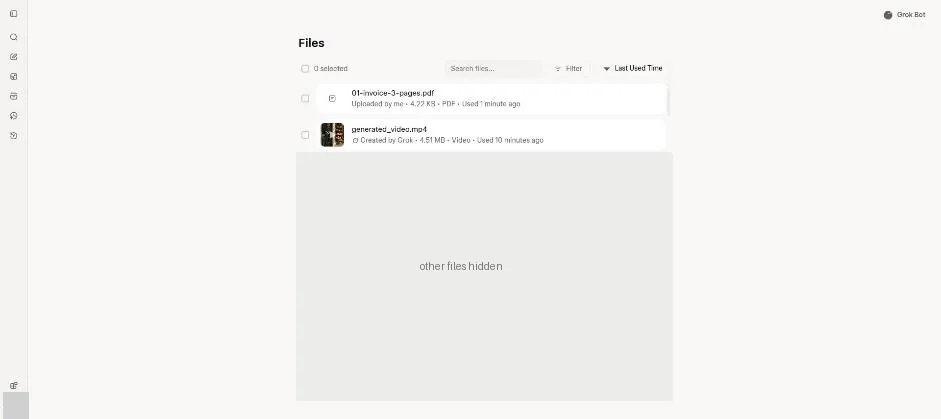
  1. Open Files.

    Grok Files page with the test invoice and bakery video at the top of the file list.Open the whole screen for step 1.

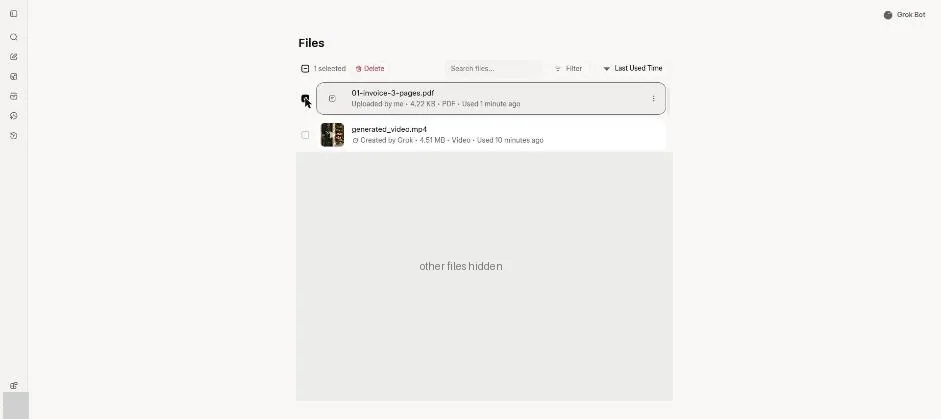
  2. Tick the test invoice file.

    Grok Files page with one file selected and a red Delete button.Open the whole screen for step 2.

    You see one file selected and a Delete button.

Click a picture to see it full size.

See every Grok feature

Change your app or plan

App

We can't see your account. You tell us, and we show what that plan includes. We save your choices in this browser. They may disappear if you clear your browser data or use private browsing.

Report a problem

About:

What's the problem?

Please don't include private information. We keep reports for 90 days and don't store your email or IP address.