
Inline charts and interactive apps in Claude
Your plan
We haven't checked whether Inline charts and interactive apps is in Claude Free.
We haven't checked whether Inline charts and interactive apps is in Claude Pro.
We haven't checked whether Inline charts and interactive apps is in Claude Max 5x.
We haven't checked whether Inline charts and interactive apps is in Claude Max 20x.
We haven't checked whether Inline charts and interactive apps is in Claude Team Standard.
We haven't checked whether Inline charts and interactive apps is in Claude Team Premium.
We haven't checked whether Inline charts and interactive apps is in Claude Enterprise.
Tell us your plan to see the answer for it.
In each plan
We haven't checked which plans include this yet.
Show every plan
For you
| Free | Not checked yet* |
|---|---|
| Pro | Not checked yet* |
| Max 5x | Not checked yet* |
| Max 20x | Not checked yet* |
For teams, companies and schools
| Team Standard | Not checked yet* |
|---|---|
| Team Premium | Not checked yet* |
| Enterprise | Not checked yet* |
Step by step
Type the moon phase request.
Explain the phases of the moon with a diagram I can click or hover over.

Press Enter.
You see a status about designing the diagram.
Wait for the diagram.
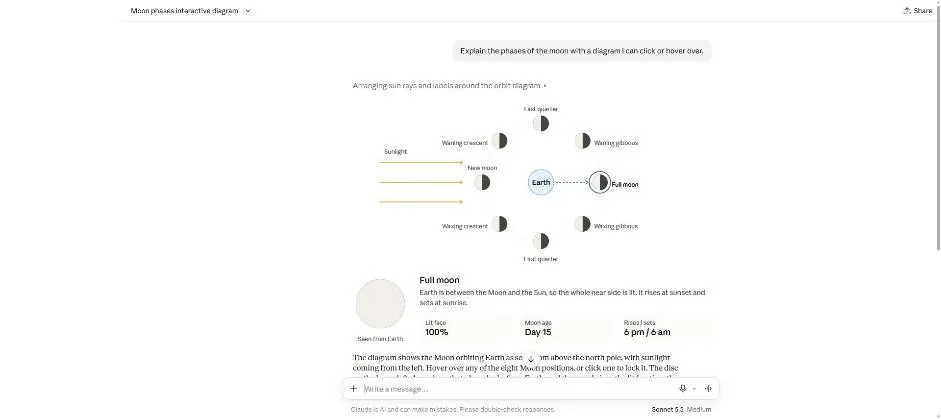
You see the diagram with Full moon selected.
Click the moon at the bottom of the orbit.
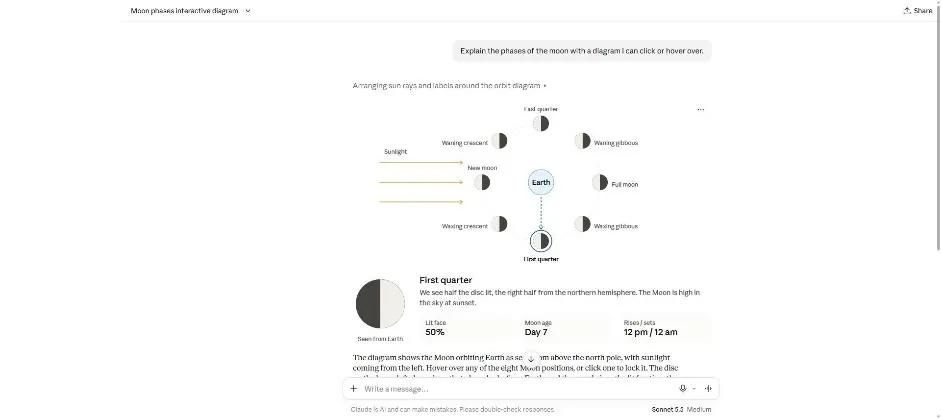
You see First quarter selected and a half-lit disc.
Click a picture to see it full size.